Using Dais as a Headless Platform for Premium Finance Capabilities
This guide illustrates a configured integration among Dais, a broker, a carrier, and a premium finance provider. Provider communication, e-signing, payment collection, and notifications require the corresponding integration setup.
The diagram shows a possible premium finance workflow. It is an integration design, not a guarantee that a single API call performs every step. For available operations and request fields, see Policy Finance.
Sequence Diagram Overview#
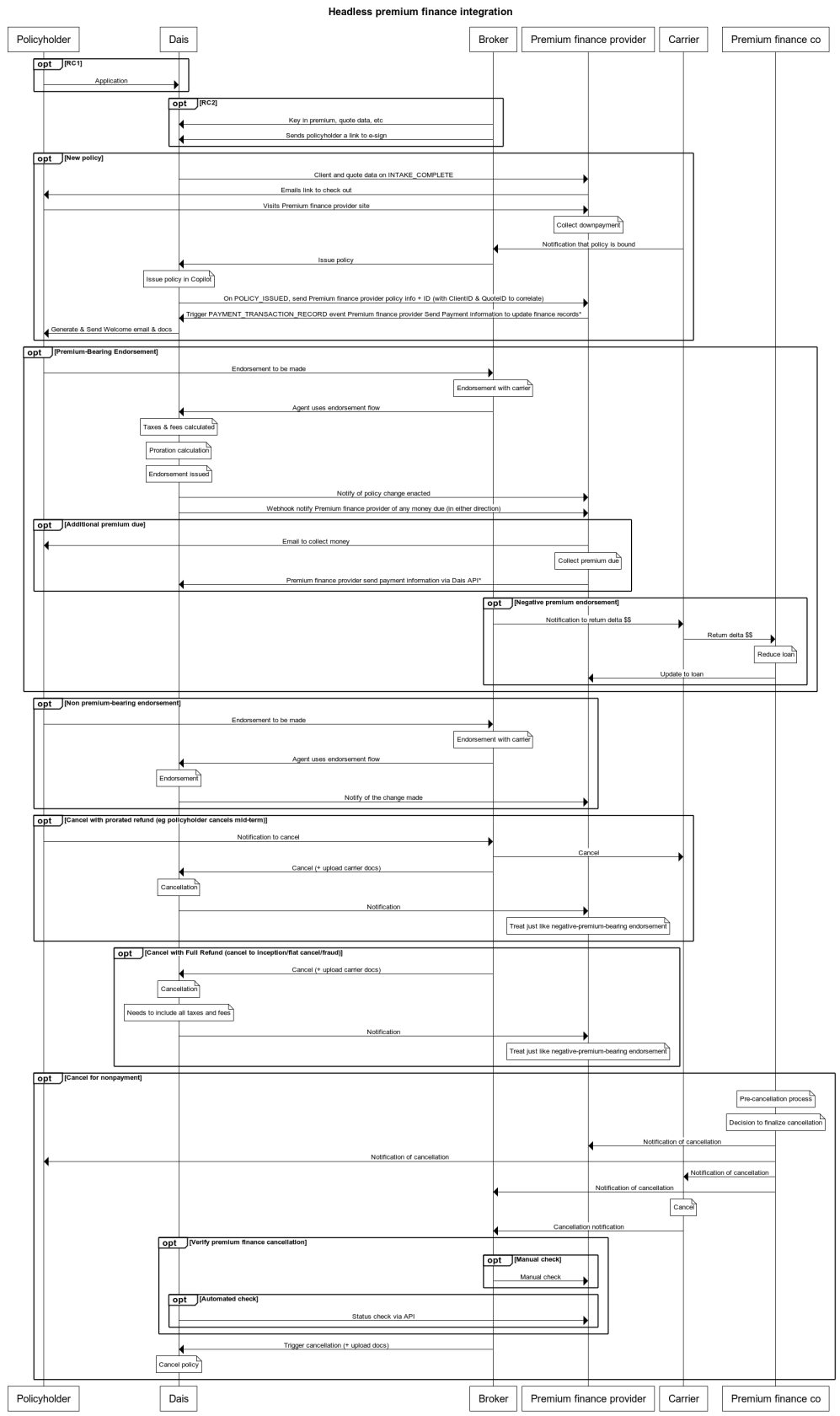
The sequence diagram titled "Headless premium finance integration" maps each step in the process of how Dais interacts with a policyholder, broker, carrier, and premium finance provider to handle a range of scenarios like new policy issuance, policy changes, and cancellations.
Key Players:#
- Policyholder: The insured individual or company.
- Dais: The SaaS platform used to manage insurance products.
- Premium finance provider: The financing company that enables the policyholder to pay their insurance premium in installments.
- Broker: Intermediary who serves the interests of the policyholder and acts on their behalf.
- Carrier: The insurance company, responsible for underwriting insurance risks.
Exploring the Diagram:#
New Policy Creation:
In this scenario, the policyholder applies for a policy through Dais. The broker then keys in the premium and quote data, provides the policyholder with a link to e-sign, and subsequently, issues the policy. Throughout these steps, Dais communicates with the premium finance provider, sending client and quote data, and finally, issuing the policy. The premium finance provider collects the downpayment, and then upon policy issuance, communicates with Dais regarding the payment transaction record.
Premium-Bearing Endorsements:
If the policyholder requires a change that will impact the policy’s premium, they can request an endorsement through the broker. The broker will make the necessary changes, with Dais handling the calculations for taxes, fees, and prorations. Any premium changes are communicated to the premium finance provider who will then notify the policyholder of any additional charges or refunds.
Non-premium-bearing Endorsements:
Here, the policyholder needs a change to the policy that does not impact the premium. The process is quite similar to a premium-bearing endorsement, without any financial adjustments.
Policy Cancellation:
The policyholder may decide to cancel the policy. Depending on whether it's a prorated refund, full refund, or for non-payment, Dais interacts with the broker and premium finance provider differently. For cancellations with refunds, Dais notifies the premium finance provider, who in turn processes the refund as applicable.
Configure the policy calculations and provider actions required for each scenario. Coordinate refunds, payment records, and notifications with the provider integration.